What is UPDATE or UPGRADE?
Why we need it?
Why we need it?
"Updates are additions to software that can help prevent or fix problems, improve how your computer works, or enhance your computing experience."
"Upgrades introduce improvements and new features"
"Upgrades address/correct bugs encountered in prior versions."
and a lot more...
Now that you have an idea how important updates are, let's proceed to our next step...
Prepare your pfSense for an update/upgrade....
Prepare your pfSense for an update/upgrade....
Anything can happen,and for some reasons, your system may become unstable while updating or maybe after the update. So it is a good idea to back up first your configuration settings before doing the update. So that if the update goes wrong, you have a chance to go back to your previous stable state...
Here's how to back up your configuration:
1. Go to DIAGNOSTIC tab of your pfSenseGUI and click Backup/Restore.
1.1. Diagnostics: Backup/restore page will open and you have now the option to Backup or Restore configuration
2. Click DOWNLOAD CONFIGURATION and save it on a secure location or directory.
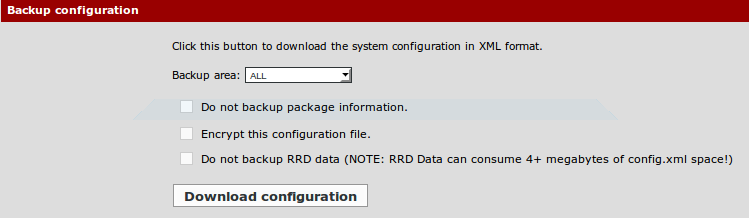
That's it. You now have a backup of your configuration. (Settings, Rules, Packages, more...)
Now that we have the backup configuration, we can now proceed on updating our pfSense.
As of now 2.1.5 is the new and latest version. - "The 2.1.5 release follows shortly after 2.1.4 and is primarily a security release." read more here
Here's how to update your pfSense:
1. Check the VERSION Status section of your pfSense on your dashboard.
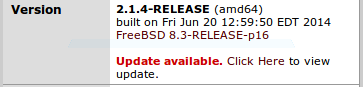
1.1. You will see UPDATE AVAILABLE if there's an update available for you as you can see on the picture above. If your pfSense is updated, then it will tell you that "You are on the latest version."
1.2. Click CLICK HERE to open the update page.
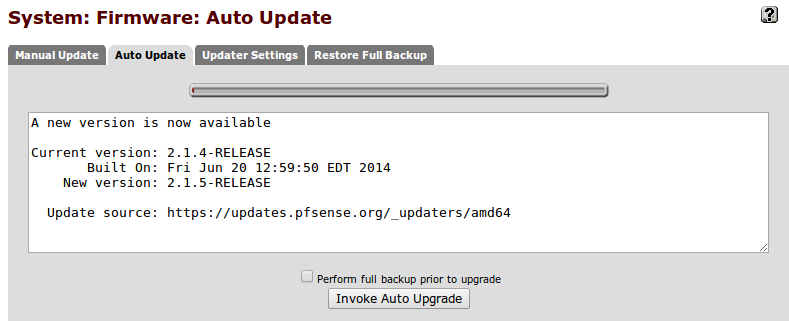
2. As you can see on the picture above, the current version that I have is 2.1.4 and the newer version is 2.1.5... Click INVOKE AUTO UPGRADE to update/upgrade pfSense.
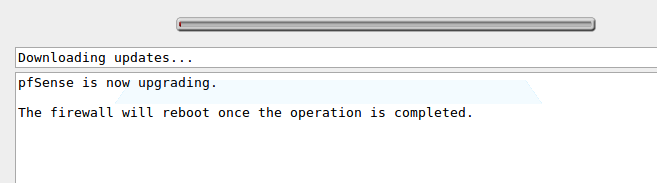
3. pfSense will download the updates now.
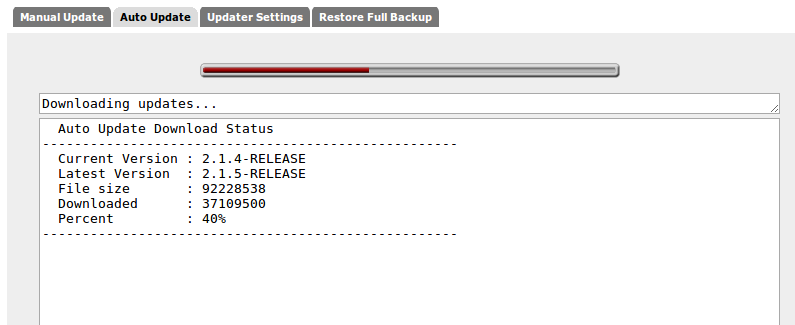
3.1. Be patient. Wait. Your pfSense will reboot if it is done.
4. Once it is done, access your pfSense webgui again and check the VersionStatus. You must see 2.1.5 Release and "you are on the latest version"
-Done! :) Good job!
Note: If something is wrong about the new and updated version, you can go back to your previous configuration or setup using the backup that we did earlier... just upload the backup config file on Diagnostic Backup/Restore page.
1. Go to DIAGNOSTIC tab of your pfSenseGUI and click Backup/Restore.
1.1. Diagnostics: Backup/restore page will open and you have now the option to Backup or Restore configuration
2. Click DOWNLOAD CONFIGURATION and save it on a secure location or directory.
That's it. You now have a backup of your configuration. (Settings, Rules, Packages, more...)
Now that we have the backup configuration, we can now proceed on updating our pfSense.
As of now 2.1.5 is the new and latest version. - "The 2.1.5 release follows shortly after 2.1.4 and is primarily a security release." read more here
Here's how to update your pfSense:
1. Check the VERSION Status section of your pfSense on your dashboard.
1.1. You will see UPDATE AVAILABLE if there's an update available for you as you can see on the picture above. If your pfSense is updated, then it will tell you that "You are on the latest version."
1.2. Click CLICK HERE to open the update page.
2. As you can see on the picture above, the current version that I have is 2.1.4 and the newer version is 2.1.5... Click INVOKE AUTO UPGRADE to update/upgrade pfSense.
3. pfSense will download the updates now.
3.1. Be patient. Wait. Your pfSense will reboot if it is done.
4. Once it is done, access your pfSense webgui again and check the VersionStatus. You must see 2.1.5 Release and "you are on the latest version"
-Done! :) Good job!
Note: If something is wrong about the new and updated version, you can go back to your previous configuration or setup using the backup that we did earlier... just upload the backup config file on Diagnostic Backup/Restore page.


